Try our 30-day free trial with your students and teachers today.


Picture
EASY SET-UP
Get your classes set-up and start typing in as little as 5 minutes! Access anywhere,anytime from any computer connected to the internet.
CUSTOMIZABLE
Designed especially for school use, All The Right Type has many customizable options and features to to easily manage classes of all sizes, or at the school or district level.
NO ADS
You never have to worry about your students being bombarded by ads. Learn to type with no unnecessary distractions!

Learn how to touch type in the most effective and efficient way with All The Right Type's no nonsense approach. Our learning methodology was designed by keyboarding specialists so that you will see positive results quickly.
From school or from home you can continue your lesson where you left off to improve your typing skills and save valuable time. All The Right Type was designed especially for school use and has all the tools teachers need to help their students improve their typing skills.
Features

Picture       EASY SET-UP
  • Access from any device with an internet connection
  • Teacher Maintenance options to manage schools/classes
  • Bulk student uploads via CSV
  • Move students easily, between classes or schools
  • Login cards for quick access
    Picture       CUSTOMIZABLE
  • Create custom lessons, texts, and typing games
  • Upload your own content for personalized practice
  • Modify and sequence lessons to fit your students' needs
  • Add your school logo and branding
  • Adjustable display settings for optimal readability
    Picture       ENGAGING & FUN
  • 600+ interactive typing lessons
  • Games and challenges tailored to student interests
  • Compete in global typing competitions
  • Dictation exercises to build real-world skills
  • Self-paced learning with goal setting
    Picture       SMART LEARNING
  • Proven learning methods with structured lesson flow
  • Visual guidance for posture and finger placement
  • Detailed finger and typing analysis
  • Built-in number pad training
  • Instant feedback with narration and reinforcement
    Picture       REPORT & TESTING
  • Track progress with real-time performance insights
  • Timed, speed, and diagnostic typing tests
  • Automatic WPM tracking and improvement summaries
  • Classroom and individual reporting, including report cards
  • Certificates and assessment-ready record keeping
    Picture       SUPPORT
  • Guided setup to get started quickly
  • Help center, email support, and FAQs
  • Step-by-step video tutorials
  • Ongoing updates and feedback-driven improvements
    Why All The Right Type is Your School's Best Choice
    Picture
    Picture All The Right Type is a beneficial program that has been used in intermediate classrooms at Aspengrove School for many years. The students love that they are able
    to practice both in the classroom and at home, they find the program easy to navigate, and they enjoy the games. As a teacher, I find the program easy to set-up, students are able to enhance their spelling and word decoding, and this program can make a skill that can feel repetitive more enjoyable and purposeful. Picture

    - Mindy Livingston, Grade 4 teacher, Aspengrove School
    Picture
    Picture We have been using All The Right Type for over ten years in our Information Processing classes and it's become a staple of the course. The structure that it provides
    makes it is easy for students to follow and develop their typing skills. The admin tools make it easy for teachers to set students up with the appropriate learning and then track their progress. Students of all levels and abilities continue to find success with this program. Picture

    - Noah Boivin, Sir John A MacDonald School
    Picture
    Picture Our school has a focus on digital literacy. We really love All The Right Type and find it a super program for
    word processing skills. Picture

    - Trish Weaver, Head teacher, Immaculate Conception School
    Picture
    Picture I've been using All The Right Type for 20+ years in classrooms. My students love the program, and it's easy for me to track their progress through the lessons.
    Picture

    - Derek Gossman, Teacher, Alamitos Intermediate School
    Picture I was fortunate to learn typing in elementary school with All The Right Type. I've heard that, in some schools, students are no longer learning typing as part of their
    curriculum, which seems like a missed opportunity. I'm glad to see Ingenuity Works continuing to power and improve the program to this day. Picture

    - Rory B, past School Version Student
    Picture When I was in middle school in 2001-3 typing was my favorite class by far. We used All The Right Type and I absolutely loved it. I was able to type 100 WPM and I still
    can! When I type around a new person they usually look at me a little shocked. I have had several jobs that hired me based on my speed. I loved ATRT so much that I made a promise to myself to use it for my child when I was a parent. It's 2024, and my son is 10 years old and in middle school and I just found out they don't teach typing in school anymore! The most important skill! I got an ATRT subscription immediately to work with him. Thank you All The Right Type! Picture

    - Cindy P, Parent
    Teacher/Administrator Dashboard
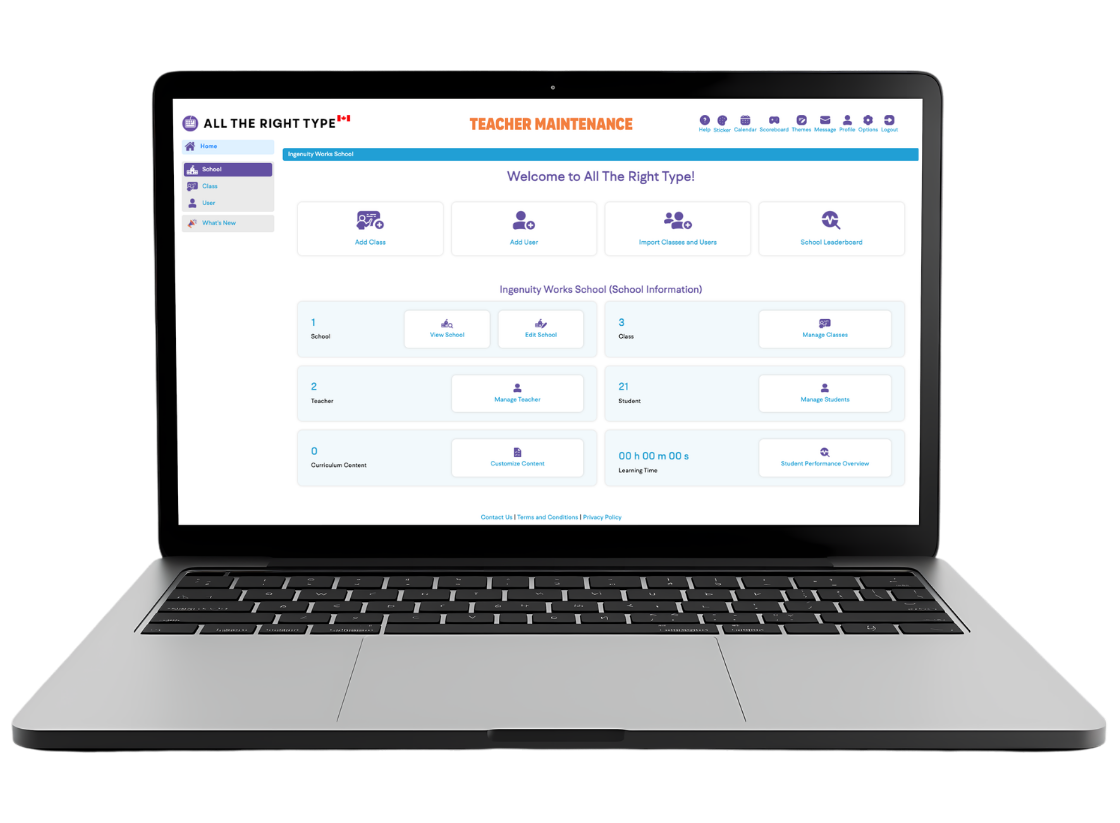
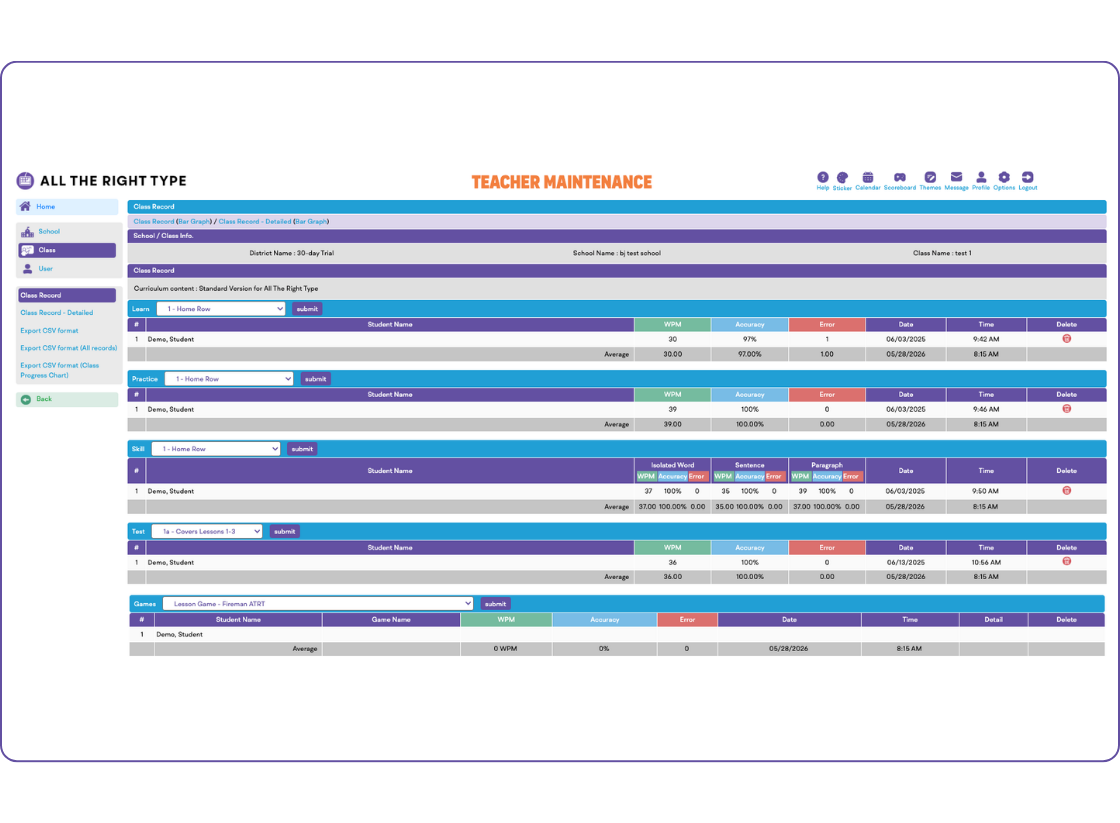
    Our updated Teacher Maintenance dashboard and menu bar simplifies user management, while improved menu options and a cleaner layout make navigation faster and more intuitive.

    Teachers and Account Admins now have a more streamlined experience for overseeing their accounts, and our expanded School FAQs provide helpful guidance tailored just for schools, boards, and districts. Everything you need-now easier to find, use, and understand.


    All The Right Type
    All The Right Type has four types of lessons that support immediate reinforcement (learn, practice, skill and test). If "sequencing" is turned on, users must follow the learning pattern designed by keyboarding specialists. The maintenance section has many exceptional features for managing the account.
    All The Right Type

    SSO Login Options
    Single Sign-On (SSO) is an authentication process that allows users to access multiple applications or systems with just one set of login credentials (such as username and password). In essence, it enables users to log in once and gain access to all authorized resources without being prompted to log in again at each subsequent system.
    Picture Picture Picture

    Theme Pages
    User interface is changeable, so that All The Right Type is enjoyed by all ages. Improving keyboarding skills is like swimming. Everyone needs to start at the same point, however, learners can progress at their own speed with different goals. Our lessons and learning methodology focus on finger reach and automaticity, therefore, advance keyboarding skills as quickly as possible.
    Picture

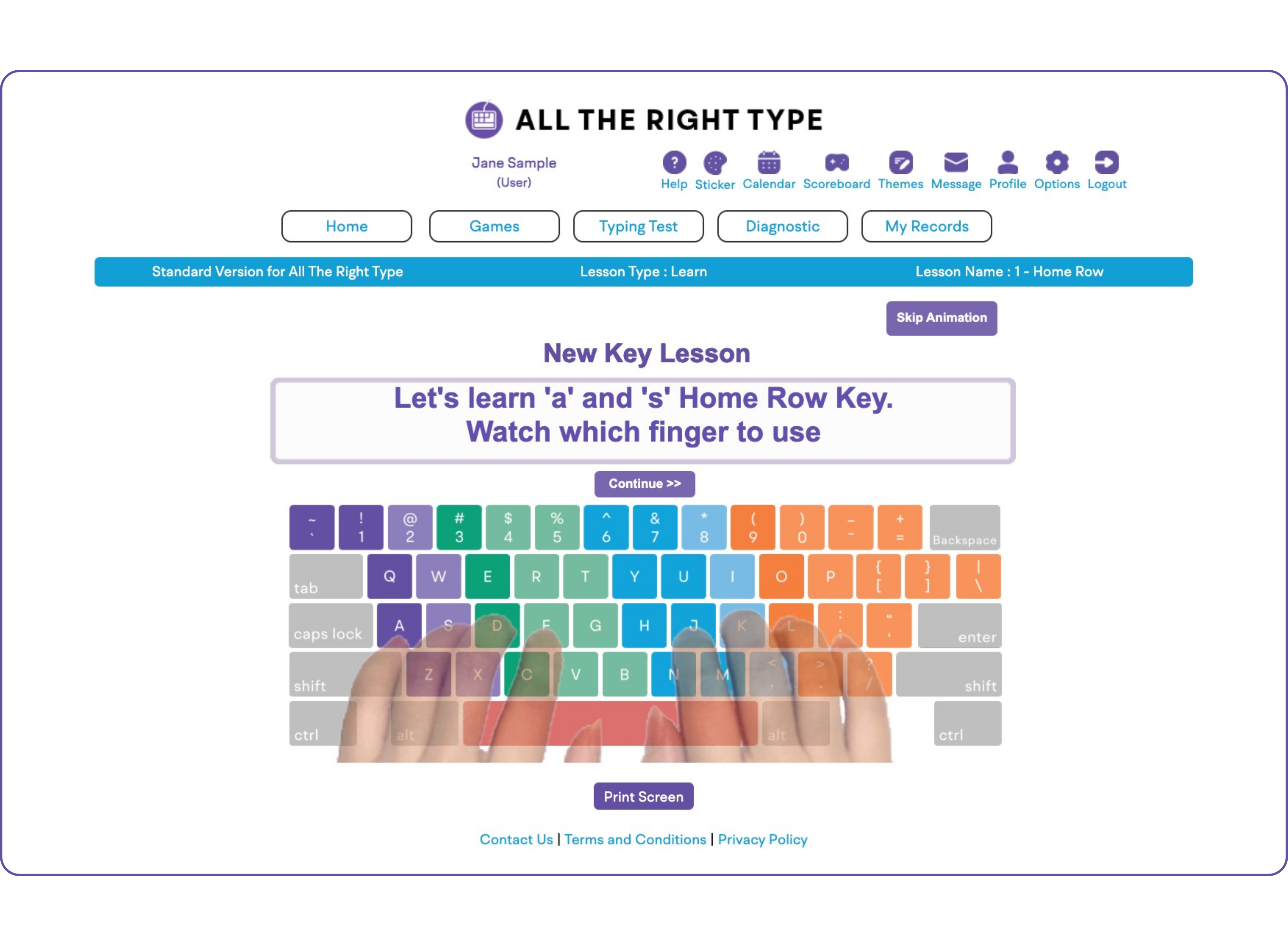
    Hand Position
    Animated fingers, to display proper fingering and reach. Users are then presented with several lines of text which they must type correctly to progress to the next key. If a mistake is made, users will see immediate feedback in the form of an animation of the correct fingering and reach.
    Picture
    Try our 30-day free trial with your students and teachers today.


    Learn
    After completing each line in the "learn" type lesson, users will see a report and get immediate feedback finger analysis. A critical All The Right Type advantage is the letter-by-letter error checking to report the individual finger that the user should focus on. The program will prompt users to redo the lesson if they have not achieved the level of accuracy set by the account administrator.
    Picture

    Practice
    The keys presented are the same keys that students have learned in the previous "learn" type lesson; however, the learning focus has moved to using the letters in words and sentences.
    Picture

    Games
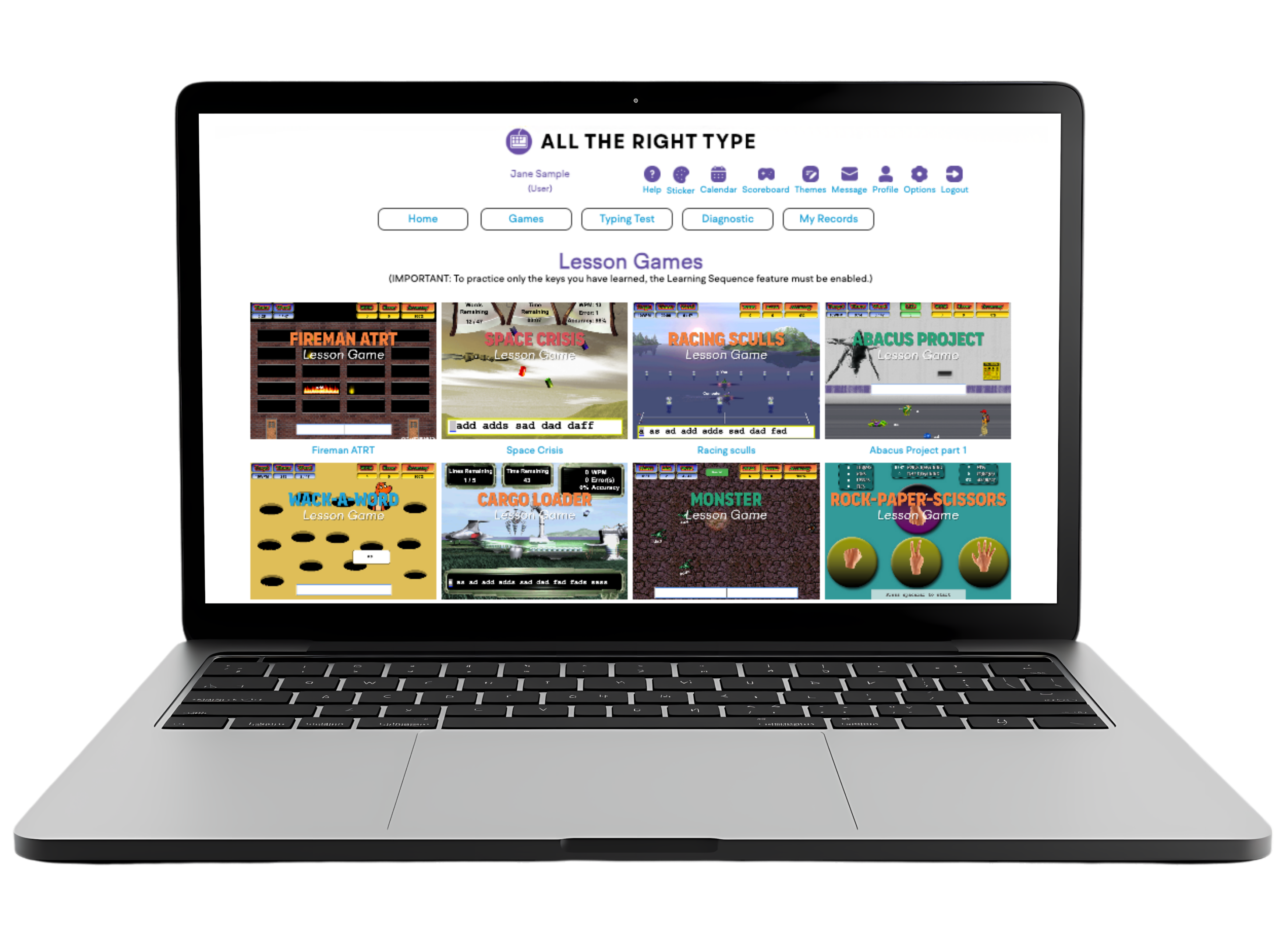
    We have two types of games: Lesson Games which follow the same letters that users have learned if sequencing (time-tested effective learning order) has been turned on, and Themed Games. In themed games we have also incorporated basic math keyboarding (number-pad) lessons as well as "dictation" or "note-taking" type games to reinforce keyboarding without text to copy. All game results are tracked into the database for recordkeeping.
    Picture

    Lessons
    The Admin has the control to modify, create and sequence lessons to better suit the needs of their users.
    Picture
    Try our 30-day free trial with your students and teachers today.
    Access Test Records
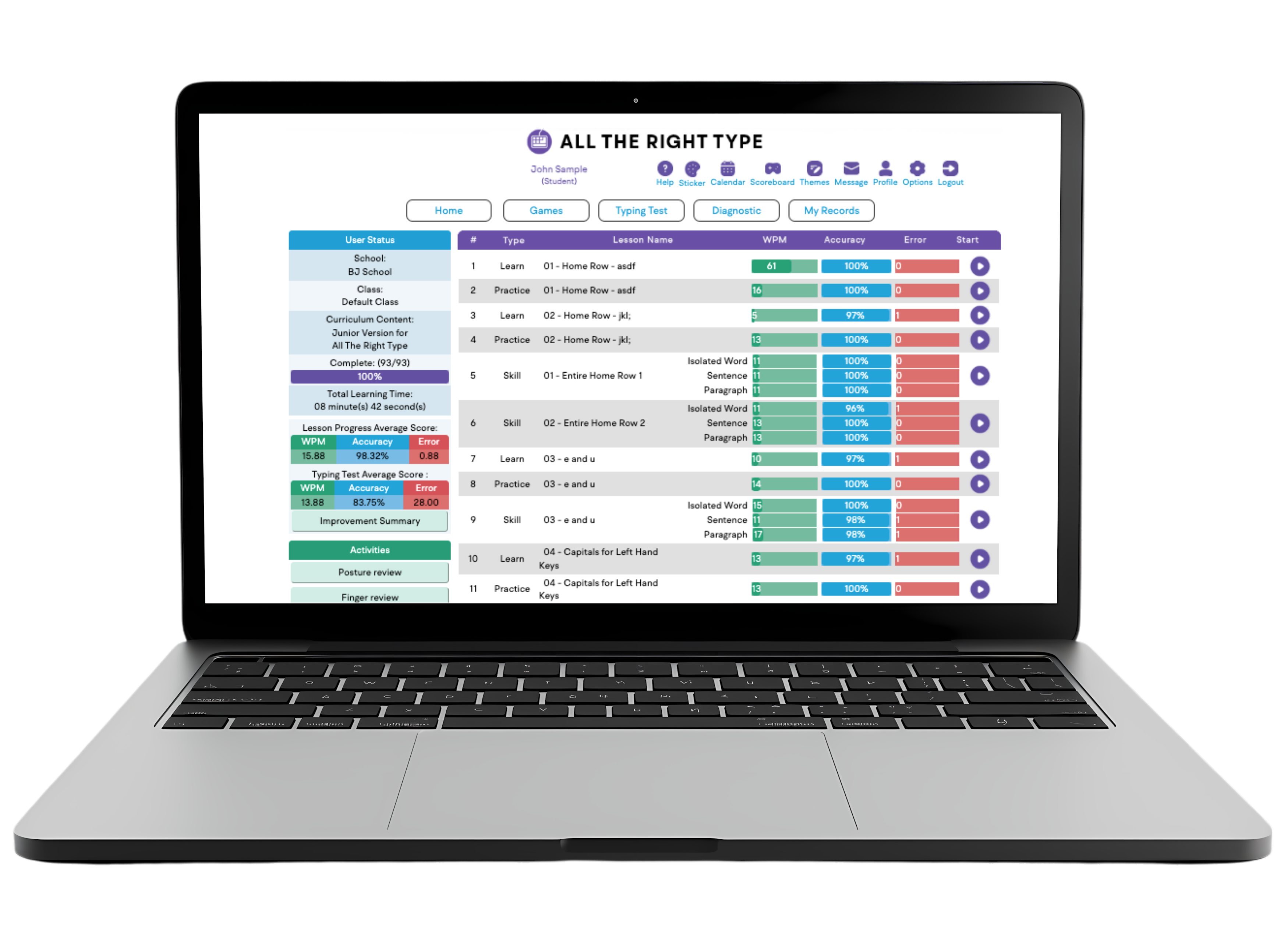
    Several types of student/class/school reports are available in our "Teacher Maintenance" section. Teachers and account admins have easy access to review their students' test scores, user words-per-minute (WPM), accuracy, error levels, time spent using the program, and latest login date.
    Picture
    Try our 30-day free trial with your students and teachers today.


    Choose Your Version

    Single-User
    Version

    Great for professionals
    or students for one user
    $5 USD/monthly
    $40 USD/yearly
    Learn to type or
    increase your typing speed.
    Lesson sequencing learning method designed by keyboarding specialists. 

    All ages
    1 subscription

    Homeschool
    Version

    1 admin account,
    plus up to 5 users
    $8 USD/monthly
    $60 USD/yearly
    Same program as the school version, but with simplified features to easily manage a smaller group or class size. Great for homeschools, groups or families.

    ​All ages
    6 subscriptions

    School
    Version

    For Schools or Districts,
    up to 5000+ users
    Ready-to-use typing program with many easy features for managing classes of all sizes, or at the school or district level.


    All ages
    1 - 5000+ subscriptions